How to Give Brand Feedback and Content Revisions That Ship
One version, one deadline and one list of notes: how a brand reviews a creator draft without starting a fourth round.
 Written by Jack Evans5 min read

Brand feedback and content revisions work best when every note lands in one place, on one version, by one deadline. Watch the draft first, write each change with a timestamp and a reason, then send all notes together in a single round. One consolidated round protects the posting date and keeps the creator on side.
On this page
- Why do scattered notes multiply revisions?
- What does useful feedback on a creator draft look like?
- How do you give brand feedback and content revisions in one round?
- Which requests are revisions and which are new scope?
- When should feedback arrive relative to the posting date?
- How should a brand record the approval?
- Should a brand keep drafts and notes in one place?
Brand feedback and content revisions work best when every note lands in one place, on one version, by one deadline. Watch the draft first, write each change with a timestamp and a reason, then send all notes together in a single round. One consolidated round protects the posting date and keeps the creator on side.
Why do scattered notes multiply revisions?
In practice, your notes on a creator draft probably do not live in one place. There is a message after dinner, a comment on a shared document, a thread with two other people in it, and a voice note on top. The creator reads all four, works out which is current, and guesses which ones are must-fixes.
The delay this causes is not in anyone's head. According to a survey of more than 300 marketing leaders by Knak, 85% missed at least one planned campaign launch date in the previous 12 months, and approvals and sign-off was the top cause, named by 47% (PR Newswire). The same study found 69% of teams need two to three rounds of revision before work ships, while 51% still run approvals through email, Slack or Teams threads.
Scattered notes also tax the person doing the work. Research by Gloria Mark at UC Irvine puts the cost of one interruption at about 23 minutes to get back into the task you left (UC Irvine). So five pings across one afternoon is close to two working hours gone before anyone touches the edit again.
Neither number is about talent. Instead, both are about where the notes land.
What does useful feedback on a creator draft look like?
Useful notes share four traits, and a note missing one of them usually buys another round.
- Timestamped. "At 0:14 say the price on screen" beats "the middle bit feels off".
- Tied to one version. Name the cut: v1 or v2. Notes on a link you retired yesterday are work nobody can use.
- A reason with every request. "Change X to Y because Z" lets the creator settle two notes that pull in opposite directions. "Make it pop" gives them nothing to act on.
- In one destination. All the notes for one draft in one message or one pinned thread, not spread across three chat apps.
How do you give brand feedback and content revisions in one round?
Five steps, one consolidated round of notes. Step four carries a template you can paste today.
-
Agree the rounds and the feedback date before filming. Ask how many revision rounds the rate includes and when notes are due, while the brief is still open, and put it in writing. The Social Media Brief Generator gives you a structure to write those lines into, and the scope creep guide carries the wording for what sits inside a round and what does not.
-
Watch the draft all the way through before you type. First pass, no notes, phone in your hand. On the second pass, stop at each timestamp and write the change. Notes typed mid-watch are half-remembered and often describe a different cut from the one on screen.
-
Sort the must-fixes from the nice-to-haves. A must-fix is a wrong price, a wrong product name, a claim legal will not clear, or anything off-brand. A nice-to-have is the colour grade, the music bed, an alternate hook. Then label each note as must-fix or optional. A creator can action three must-fixes and skip two preferences in the same pass, but an unlabelled list makes them guess what you will reject.
-
Send every note in one message, using this template.
Draft: [product], v1
Notes due: [day] at [time]     Go-live: [date]

Must fix
- 0:12  Say "SPF 50" on screen, not "SPF 30". Legal needs the exact figure.
- 0:31  Cut the free shipping line. That offer ended on 3 October.
- Caption  Open with the product name, not the offer.

Optional
- 0:04  Warmer colour grade if it is quick. Not worth a reshoot.

Everything else is right as filmed. One round, back to me by [day].
- Finally, tap Approve when the cut is right, not when it is perfect. In The Creator List the creator uploads the draft for review, you pin a timed note to the exact second of the video or image from your phone, and Approve is a button on the same screen. Note the version, date and name with your tap, so the yes is findable later.
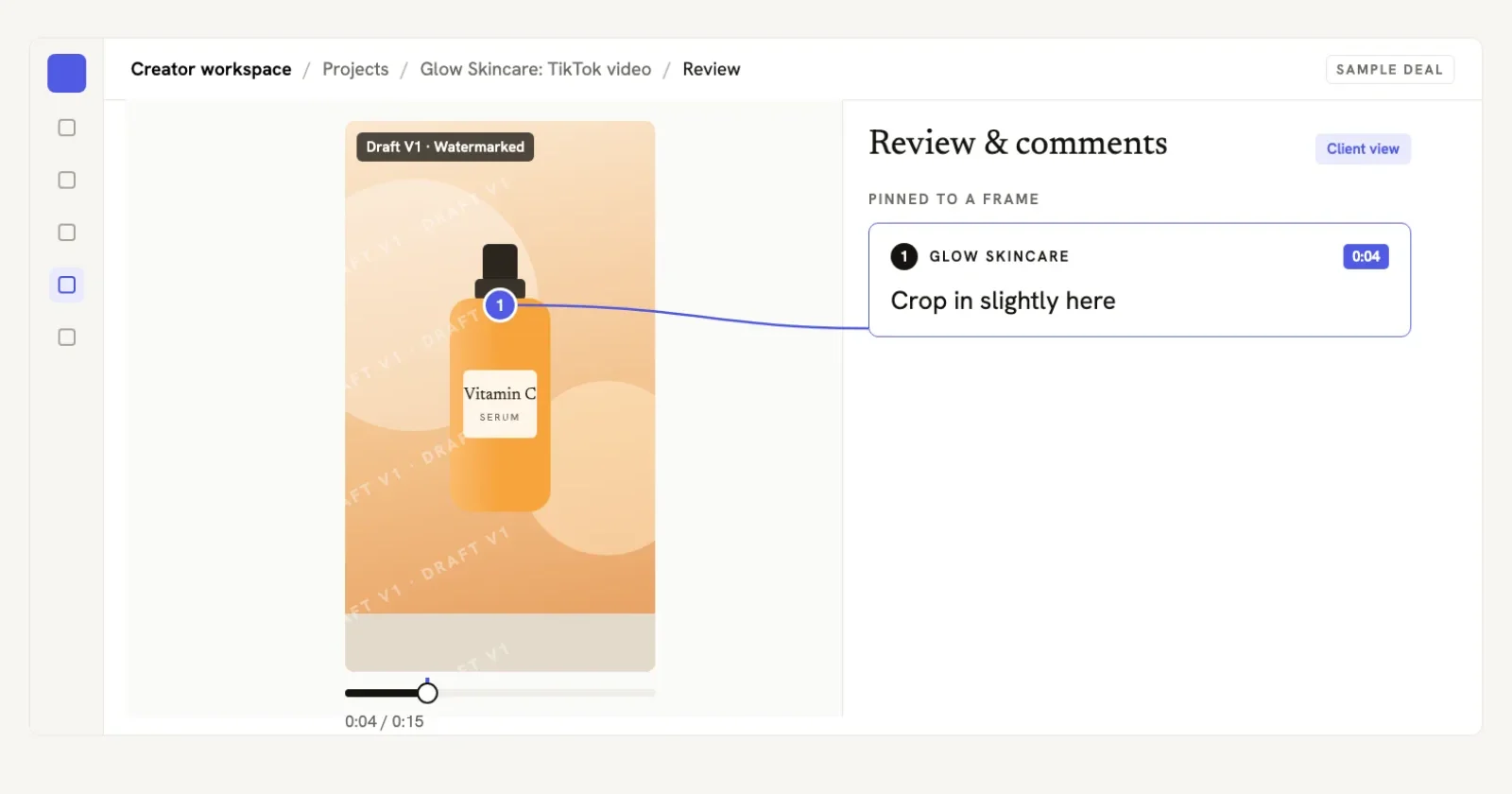
In The Creator List: a client note pinned to the exact second of the draft it refers to.
Which requests are revisions and which are new scope?
A revision fixes what the brief agreed. New scope asks for work that was never quoted, and it gets quoted separately. The line between them:
- a tightened hook or a swapped caption: revision
- a different script or a hook written from scratch: new scope
- a reshoot because the product or the claim changed: new scope
- a second cut in another aspect ratio for a second platform: new scope
- anything the brief never mentioned: new scope
So name that line before the first draft arrives, and the awkward conversation never happens. The scope creep guide has the wording to drop into the brief.
When should feedback arrive relative to the posting date?
Send notes within two working days of the draft landing, and make sure the draft itself reaches you at least four days before the posting date. That gap leaves room for one revision round without moving the launch, and it gives the creator a clear day to chase if nothing arrives.
If the date slips anyway, reset it in writing rather than let both sides assume something different: notes are late, revised cut Thursday, still live Monday. A date only exists once someone has written it down.
Working with a creator who uses The Creator List?
They'll send you a private link to the brief and agreement. You sign, review every draft and approve the final cut there, free. We take no cut of what you pay them.
How should a brand record the approval?
An approval needs three things: the version number, the date, and the name of the person who said yes. "Approved v2 by Sam on 14 October" is an approval. A thumbs-up emoji from an intern with no version attached is not.
So tap Approve on the draft when you are happy with the cut. If the yes arrived in a chat app instead, write the line down yourself with the name, the date and the version. Silence is not a yes either, and neither is a comment thread that stopped moving.
Should a brand keep drafts and notes in one place?
The Creator List is a private workspace for brand deals a brand already has, not a marketplace: no hiring, no booking, no matching through us. A brand joins free as the creator's invited client, with no fee on what it pays the creator, and review happens on the draft itself: notes pinned to the second, one Approve button, phone-friendly.
If you would rather run review in your own tools, one shared document and one deadline do the same job. What matters is that every note for a given draft sits in one place, and that the yes names a version. The creator tools page shows the rest of what is there.
Your next action: open the draft you are sitting on right now, watch it once without typing, then send every note as a single message using the template above before the end of the day.
Common questions
A brand should ask how many revision rounds the creator's rate includes before the first draft arrives, and two is the number to agree. Round one covers notes on the cut delivered, round two covers small fixes such as on-screen wording. A different script, a reshoot or a new platform cut is new scope and gets quoted separately.
Feedback on a creator draft is actionable when it names the timestamp, the change to make, and the reason for the change. A note such as at 0:12 say SPF 50 on screen because legal needs the exact figure can be actioned in one pass. A note such as make it pop gives the creator nothing to work with and starts another round.
A brand should send notes within two working days of the draft arriving, and should receive the draft at least four days before the posting date. That gap leaves room for one revision round without moving the launch date, and it gives the creator a clear day to chase if no notes arrive.
If a brand misses the feedback deadline, the brand should reset the dates in writing rather than let both sides assume something different. One line does it: notes are late, revised cut on Thursday, still going live on Monday. Silence is not approval, and neither is a comment thread that simply stopped moving.
For brands
Working with a creator who uses The Creator List?
They'll send you a private link to the brief and agreement. You sign, review every draft, pin notes and approve the final cut there, free. We don't sell creators' time, and we take no cut of what you pay them.
Join the business waitlistRead next
 How Many Revisions Should a Brand Deal Include?The standard number is two rounds, a round is one consolidated list of notes, and this is the line to put in the brief before you film.
 How to Pitch Brands as a Creator: 6 Steps, 5 EmailsA practical six-step process for researching a brand, shaping a useful content concept, proving fit, setting terms and following up without sounding generic.
 UGC Creator Contract Template: What to Put in Yours as a BrandThe seven clauses a brand puts in a UGC creator agreement, plus a six-step way to write and sign it without a lawyer.
 How to Get Brand to Sign Before Filming: The Exact MessageWhy signing before filming is normal, the exact message that asks for a signature, and the email fallback when a brand refuses a full agreement.